Mobile connecting Method

  For 5G


Amrita-5G-XXX(XXX mean Room number  For Example Amrita-5G-A101 )

Click to Advanced options


Select Use device Mac for default randomize mac 

If you select the randomize MAC option every time, it will automatically change the MAC..


For 2.4G


Amrita-2.4G-XXX(XXX mean Room number  Amrita-2.4G-A101)

Click to Advanced options


Select Use device Mac for default randomize mac 

If you select the randomize MAC option every time, it will automatically change the MAC..


For Both 2.4G and 5G Default have randomize mac


Attempt to connect primarily to the 5G frequency. Use the 5G frequency to achieve faster speeds.

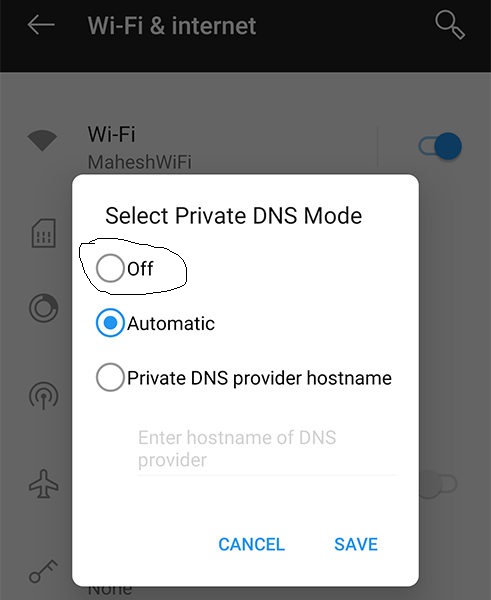
Disabling the private DNS on a mobile device will result in the restoration of internet connectivity.



If you want to know about the difference between 5G and 2.4G, click here.


Password is Amrita@2025

0 Comments

Wifi not working

   he modem is functioning properly as indicated by the green Power and Pon LEDs. The modem is experiencing a malfunction, as seen by the illuminated green Power and Pon Red LEDs. The modem is experiencing a malfunction, as evidenced by the lack of illumination in the Power and Pon LEDs.(Issue with fiber) ,Mythreyi Bhavanam  and Yagnavalkia Bhavanam                                                                                 Regarding one of the issues with fiber, there is a problem. Room WiFi SSID If this is displayed, please immediately inform your hostel warden to redify it as soon as possible .